GNU Emacs
Table of Contents
- 1. Keybindings
- 2. Commands
- 2.1. Text Manipulation
- 2.2. Shell Functionalities
- 2.3. File Manipulation
- 2.4. External Functionalities
- 2.4.1. Drag & Drop Problem
- 2.4.1.1. Summary
- 2.4.1.2. Symptom and environment
- 2.4.1.3. Background: how a drag crosses the X11/Wayland boundary
- 2.4.1.4. Root cause chain
- 2.4.1.5. The fix (applied)
- 2.4.1.6. Alternatives considered (and why they were rejected)
- 2.4.1.6.1. Switch to the pgtk build (
extra/emacs-wayland) — ✗ - 2.4.1.6.2. Run the drop targets as X11 clients — ✓ but heavy-handed
- 2.4.1.6.3. Rebuild Emacs with a one-line patch — ✓ but costly
- 2.4.1.6.4. Edit
_NET_SUPPORTEDon the XWayland root window — ✗ fragile - 2.4.1.6.5. Report upstream — recommended follow-up
- 2.4.1.6.1. Switch to the pgtk build (
- 2.4.1.7. Code trail (exact places examined)
- 2.4.1.8. References
- 2.4.1. Drag & Drop Problem
- 3. Modes
- 4. Applications
- 5. Packages
- 5.1. Evil
- 5.2. LaTeX
- 5.3. IDE
- 5.4. LSP
- 5.5. Parser
- 5.6. Appearance
- 5.7. Tool
- 5.8. Magit
- 5.9. Edit
- 5.10. Autotype
- 5.11. Completion
- 5.12. Interface
- 5.13. Workspace
- 5.14. Music
- 5.15. Frame
- 5.16. Network
- 5.17. External
- 5.18.
gtag
- 6. Configuration
- 7. Emacs Lisp
- 8. CLI
- 9. Security
- 10. Distributions
- 11. Help
- 12. History
- 13. Reference
Emacs is a keyboard-centric text editor.
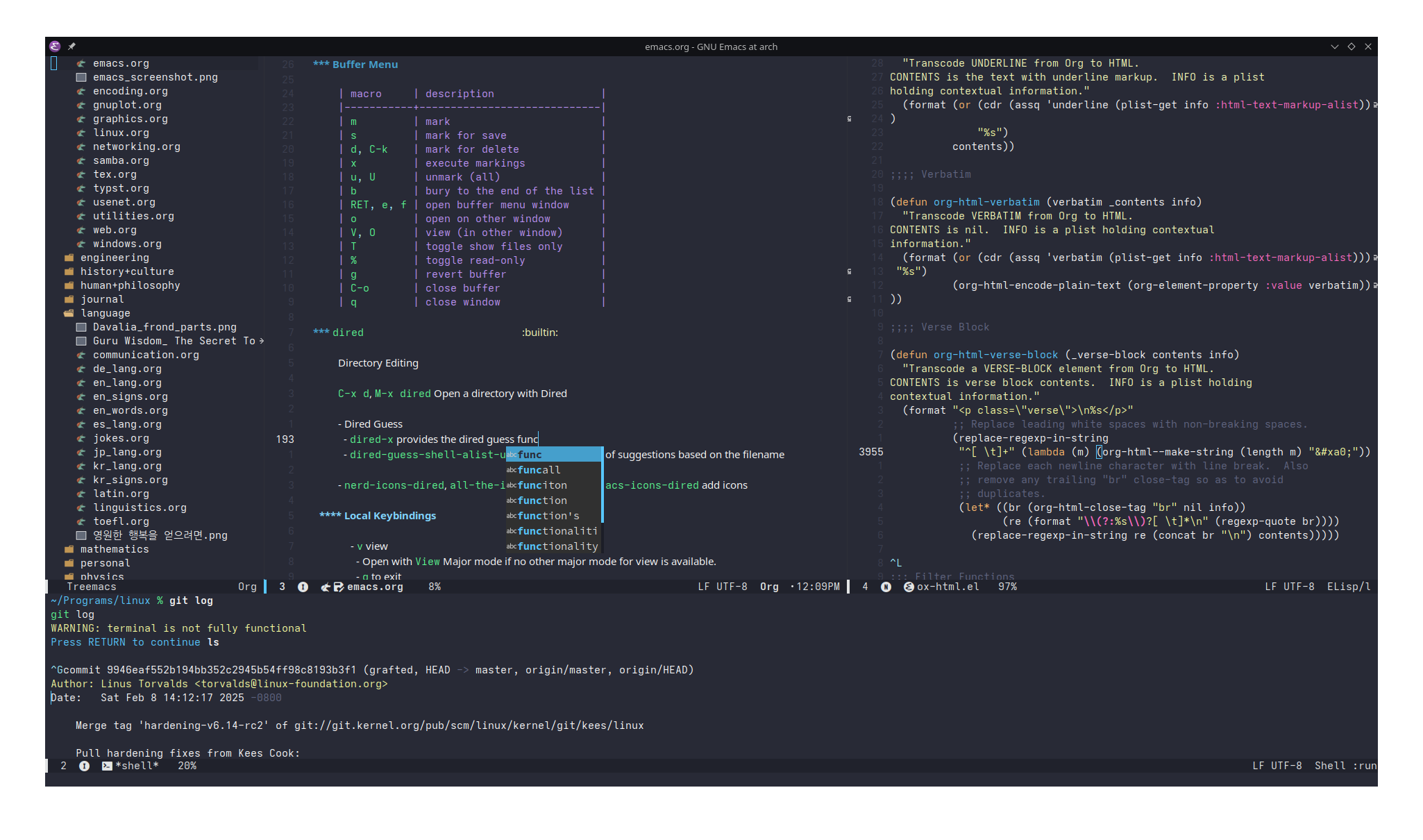
Figure 1: Screenshot of Personal Emacs Setup
1. Keybindings
1.1. Basic
| macro | command | keymap | package | file | description |
|---|---|---|---|---|---|
C-(n,p) |
next/previous line | ||||
(C,M)-(f,b) |
forward/backward, a character/word | ||||
(C,M)-v |
next/previous screen | ||||
C-M-v |
next the other window | ||||
(C,M)-(a,e) |
beginning/end of a line/sentence | ||||
C-l |
center the cursor and move screen up half a screen | ||||
M-(<,>) |
beginning/end of a file | ||||
C-u <number> <macro> |
to feed <number> to <macro> |
||||
(C,M)-(d,DEL) |
delete/kill a character after/before the cursor | ||||
(C,M)-k |
kill to the end of line/sentence | ||||
C-SPC MOTION C-w |
select and kill | ||||
C-y |
yank (paste) | ||||
M-y |
flip through the kill ring, <C-h> v kill-ring list them |
||||
C-j |
newline, evaluate lisp expression in *scratch* |
||||
C-/ |
undo | ||||
(C,M)-x |
simple/complex execute | ||||
C-g |
escape | ||||
C-(s,r) |
isearch (backward) | ||||
C-M-(s,r) |
regexp isearch (backward) the groups are colored different | ||||
M-s o |
occur, even during isearch | ||||
M-% |
query replace, even during isearch | ||||
C-M-% |
regexp query replace, that supports grouping | ||||
C-z |
suspends Emacs | ||||
C-x ESC ESC |
repeat last command | ||||
M-TAB |
dab completion based on the text in the open buffers | ||||
M-T |
(transpose-word) drag a word forward |
||||
M-\ |
remove all spaces between words | ||||
M-SPC |
contract the spaces between words into one space | ||||
M-; |
comment-dwim |
global-map |
newcomment |
newcomment.el |
insert a comment, do what I mean |
C-x C-; |
comment-line |
global-map |
. | . | comment a line |
1.2. Extended
Prefix C-x (X as in eXtend)
1.2.1. Text
| macro | description |
|---|---|
C-; |
comment out a line |
C-TAB |
indent interactively |
1.2.2. Buffer
| macro | description |
|---|---|
C-s s |
save current buffer/selected buffers |
C-w |
write current buffer to a file |
C-f |
find a file |
d |
open a directory |
C-b b |
buffer menu/type buffer name to move to |
k |
kill a buffer |
C-c |
quit |
<right> <left> |
next or previous buffer |
i |
insert a file |
1.2.3. Window
| macro | description |
|---|---|
0 |
remove window |
1 |
remove every other windows |
2 |
duplicate window below |
3 |
duplicate window to the right |
4 0 |
kill-buffer-and-window |
5 (0,1,2,o) |
do the same but to a frame |
o |
move to other window |
C-+ C-- |
zoom |
^ - + |
enlarge, shrink if larger than buffer, balance windows |
{ } |
shrink, enlarge horizontally |
1.2.4. Frame
| macro | description |
|---|---|
<f11> |
fullscreen |
M-<f10> |
maximize frame |
1.2.5. Register r
| macro | description |
|---|---|
s R |
copy region into the register R |
i R |
insert text form R |
w R |
save workspace to R |
j R |
load workspace form R |
1.2.6. Rectangle r
| macro | description |
|---|---|
o |
open rectangle filled with space |
t |
string rectangle |
d |
delete rectangle |
y |
yank rectangle |
c |
clear rectangle and fill with space |
k |
kill rectangle |
r |
copy rectangle to register |
1.2.7. Bookmark r
| macro | description |
|---|---|
m |
set bookmark at point |
M |
set bookmark, no overwrite |
b |
jump to bookmark |
l |
list bookmarks and manage |
1.2.8. Tab t
| macro | description |
|---|---|
0 |
tab-close |
1 |
tab-close-other |
2 |
tab-new |
RET |
tab-switch |
m |
tab-move |
1.2.9. Project p
A project is recognized if it's either tracked by a version control system, or EDE(Emacs Development Environment) has created the project.
1.2.10. Special Characters 8
- It is the compose key equivalent.
| macro | description |
|---|---|
RET |
(insert-char) insert unicode by its name or codepoint |
Superscript letters in Unicode | Rupert Shepherd
eemoji
| macro | description |
|---|---|
e, i |
emoji-insert |
l |
emoji-list |
1.2.11. Narrow n
| macro | description |
|---|---|
d |
to function |
n |
to region |
p |
to page |
w |
widen |
1.2.12. Version Control v
Builtin version control panel supporting various backends such as Git, Subversion (SVN), Bazaar, CVS, Mercurial, Monotone, RCS, SRC, SCCS/CSSC.
| macro | description |
|---|---|
d |
to function |
n |
to region |
p |
to page |
w |
widen |
1.3. Local Bindings
C-c may be used
1.3.1. Buffer Menu builtin
| macro | description |
|---|---|
m |
mark |
s |
mark for save |
d, C-k |
mark for delete |
x |
execute markings |
u, U |
unmark (all) |
b |
bury to the end of the list |
RET, e, f |
open buffer menu window |
o |
open on other window |
V, O |
view (in other window) |
T |
toggle show files only |
% |
toggle read-only |
g |
revert buffer |
C-o |
close buffer |
q |
close window |
1.3.2. proced builtin
list running processes, similar to top.
1.3.3. Dumb Shell builtin
C-<up>,C-<down>previous or next input
1.3.4. Outline Mode builtin
It is minor mode for markup files. It changes its behavior based on the major mode
- Help mode:
<,>beginning or end of buffer
Prefix C-c @, or sometimes C-c
| macro | description |
|---|---|
C-e, C-s, C-b, C-a |
show entry, subtree, branches, all |
C-c, C-d, C-l, C-t, C-o, C-q |
hide entry, subtree, leave, body, other, all |
C-p, C-n |
previous or next visible heading |
C-b, C-f |
backward or forward same level |
C-<, C-> |
promote or demote |
C-^, C-v |
move subtree up or down |
RET |
insert heading (it copies the previous heading) |
1.4. CUA bindigns
- Common User Access binidngs
CUA includes standard keyboard shortcuts
C-cto copyC-vto pasteC-xto cutC-zto undo.- shift-selection (
S-<arrow>) to select
and delete-selection that replaces the selected region when new text is types.
cua-mode enables them all, while cua-selection-mode only
enables shift-selection and delete-selection.
2. Commands
M-xexecute command- Every keybindings are a lisp command that can be executed in here.
M-!run shell command and output to the minibuffer- It can run
sudowith the help of-Soption that read from standard input, or with the askpass helper which isksshaskpasson KDE. C-uprefix makes the output go to the current buffer.- Use
M-|instead to accept a region as an argument.
- It can run
M-:execute a Lisp expression.view-registercompilerun compile command and format the output.greprun greprgrepsearch thoroughly
describe-modedescribe the enabled modesindent-rigidlyundo-onlyundo the region selected. It only works for the edits done natively by emacsopen-dribble-filerecord every input events into a file,recent-keysreturns last 300 input events.recover-fileselect file to recover from the auto-save filerecover-this-filealso exists.
2.1. Text Manipulation
align-regexpalign a region with ad hoc rules.fill-regionbreak a long line into smaller ones.
2.1.1. Encoding
describe-coding-system
Encode
encode-region
Decode
decode-coding-regionC-x RET r(revert-buffer-with-coding-system) try a new coding system.toggle-enable-multibyte-characterstoggle between unibyte and multibyte encoding
Translate
recode-regionrecode-file-nametranslate from one encoding to another.
2.1.2. remember
Save text in ~/.emacs.d/notes
remember-region
2.2. Shell Functionalities
M-!(shell-command) run shell command in the minibuffer and echo the result.eshell-commandrun eshell command in the minibuffer
2.3. File Manipulation
delete-file,rename-filemake-directorymake-dload-file: Load Lisp file, especially the.emacs.
2.4. External Functionalities
run-pythoncompile- It displays the result in a special buffer.
shell- Run the shell in
dumbstate
- Run the shell in
dired-mouse-dragdrag and drop dired file entry- The core DND functionalities are provided by
dndandx-dndbuiltins.
- The core DND functionalities are provided by
2.4.1. Drag & Drop Problem
Dragging files out of Emacs (dired) fails on Plasma Wayland — analysis and fix
2.4.1.1. Summary
Dragging a file from a dired buffer (dired-mouse-drag) onto a
Wayland-native application (Dolphin, Chromium) fails with:
dnd-handle-multiple-urls: Wrong type argument: window-valid-p, #<frame org - GNU Emacs at arch 0x55cb3effbc38>
Root cause: the X11 build of Emacs, running under XWayland in a KDE
Plasma Wayland session, searches for drop targets only among managed
X windows (via the _NET_CLIENT_LIST_STACKING root property). KWin's
XWayland→Wayland drag-and-drop bridge presents itself as an
unmanaged proxy X window, which is invisible to that search. Emacs
therefore concludes the drop landed on its own frame, and the
"self-drop" code path then crashes on a genuine elisp bug (a frame is
passed where a window is required) — producing the error above.
Fix applied (in init.el, and hot-loaded into the running daemon):
two pieces of advice that (1) force Emacs onto its fallback
window-walk target search during drags, which does find KWin's
bridge, and (2) make the self-drop path tolerate a frame argument.
2.4.1.2. Symptom and environment
- Error
dnd-handle-multiple-urls: Wrong type argument:
  window-valid-p, #<frame org ...>
— note the object is the frame the drag started from, i.e. Emacs delivered the drop back to itself.- Emacs
- 30.2, Arch
extra/emacs 30.2-3, X11/GTK3 build (system configuration features includeX11 GTK3, noPGTK), running as a daemon (emacs --fg-daemon) onDISPLAY:1=. - Session
- KDE Plasma 6.7.1 Wayland (
kwin_wayland 6.7.1,xorg-xwayland 24.1.12). So Emacs is an X11 client living inside XWayland. - Drop targets
- Dolphin (Qt, no
QT_QPA_PLATFORMoverride → native Wayland) and Chromium (default Ozone platform → native Wayland). Neither exists as a window on the X display Emacs is connected to. - Trigger
init.elbinds<down-mouse-1>todired-mouse-dragindired-mode-map; that command callsdnd-begin-file-drag/dnd-begin-drag-files→x-begin-drag(a C primitive).
2.4.1.3. Background: how a drag crosses the X11/Wayland boundary
2.4.1.3.1. The XDND protocol (X11 side)
In classic X11 drag-and-drop (XDND), the source application does all the work of finding the target:
- The source takes ownership of the
XdndSelectionselection. - While the mouse moves, the source itself figures out which toplevel
window is under the pointer and checks it for an
XdndAwareproperty. - It then exchanges
XdndEnter/XdndPosition/XdndDropclient messages with that window, and the target reads the data from the selection.
Crucially, "which window is under the pointer" is computed by the source — there is no server-side notion of a drag.
2.4.1.3.2. Wayland windows are invisible to X clients
Under a Wayland compositor, X11 apps run inside the XWayland server.
Native Wayland windows (Dolphin, Chromium here) are not X windows:
they don't appear in the X window tree, in XQueryTree, or in any
EWMH root property. An X11 drag source can never address them
directly.
2.4.1.3.3. KWin's XWayland→Wayland DND bridge
KWin bridges this gap (design: KDE Phabricator D15627). From the
design description and current source (src/xwl/dnd.cpp,
src/xwl/drag_x.cpp in the kwin repository):
- KWin watches the
XdndSelectionowner. When an X client starts a drag, KWin tracks the pointer itself (it owns input on Wayland). - When the pointer enters a Wayland-native window, KWin maps a
proxy X window — created directly on the root window, 8192×8192,
carrying an
XdndAwareproperty, raised viaworkspace()->addManualOverlay(m_window)(seeWlVisit::WlVisitindrag_x.cpp). - The X source is expected to find this proxy as the topmost window
under the pointer, and speak ordinary XDND to it; KWin translates
the messages into
wl_data_deviceprotocol for the Wayland target. - When the pointer leaves the Wayland window, the proxy is unmapped.
This works with GTK/Qt drag sources, because their target search is
the classic "walk the window tree from the root with
XTranslateCoordinates, take the topmost XdndAware window" —
stacking order is all that matters, managed or not.
2.4.1.4. Root cause chain
2.4.1.4.1. 1. Emacs enumerates drop targets from _NET_CLIENT_LIST_STACKING
Emacs implements the XDND source in C (src/xterm.c). At the start
of each drag (x_dnd_begin_drag_and_drop, around line 12911 in the
30.2 source):
x_dnd_use_toplevels
  = x_wm_supports (f, FRAME_DISPLAY_INFO (f)->Xatom_net_client_list_stacking);
KWin advertises _NET_CLIENT_LIST_STACKING in _NET_SUPPORTED
(verified with xprop -root on :1), so this is true, and Emacs
uses x_dnd_compute_toplevels (xterm.c ≈ line 3019), which reads the
target candidate list from:
XGetWindowProperty (dpyinfo->display, dpyinfo->root_window,
                    dpyinfo->Xatom_net_client_list_stacking, ...)
_NET_CLIENT_LIST_STACKING is set by the window manager and contains
only windows the WM manages.
2.4.1.4.2. 2. KWin's bridge proxy is unmanaged — Emacs never sees it
The proxy from WlVisit is an override-redirect-style manual overlay,
never managed by KWin-as-WM, and therefore never appears in
_NET_CLIENT_LIST_STACKING. So while the classic tree-walk used by
GTK/Qt finds it instantly, Emacs's toplevel-list search cannot — the
bridge might as well not exist.
This is an unfixed incompatibility as of Emacs 30.2 and current
master (the master x_dnd_compute_toplevels differs only in
allocation style).
2.4.1.4.3. 3. The drop resolves to Emacs's own frame (self-drop)
When you release the mouse over Dolphin, Emacs's
x_dnd_get_target_window (xterm.c ≈ line 4154) checks its toplevel
list at the pointer's root coordinates. The only X window there is
Emacs's own frame lying underneath the (X-invisible) Dolphin window,
so the function returns the source frame with was_frame = true.
Emacs then synthesizes an internal drag-n-drop event: "the
XdndSelection contents were dropped on this frame".
(Had the pointer been over a spot with no X window at all, the drag would have silently done nothing instead of erroring.)
2.4.1.4.4. 4. The elisp bug that produces the actual error message
The self-drop event is handled by x-dnd-handle-drag-n-drop-event
(lisp/x-dnd.el). It computes (posn-window (event-start event)) —
and because the drop coordinates don't fall inside a live ordinary
window of the frame, posn-window returns the frame object itself.
That frame is passed down:
x-dnd-handle-drag-n-drop-event
  → x-dnd-drop-data          (window-live-p check fails for a frame,
                               falls into the "other window" branch,
                               but still passes the frame through)
  → x-dnd-handle-uri-list
  → dnd-handle-multiple-urls  (dnd.el line 195)
      (with-selected-window window ...)   ; ← frame ≠ window
with-selected-window requires a valid window, hence:
Wrong type argument: window-valid-p, #<frame org - GNU Emacs at arch ...>
So the error message is only the last domino — the real failure happened in target detection.
2.4.1.5. The fix (applied)
Both changes live in init.el directly after the (use-package dired ...) block,
and were also evaluated in the running daemon with
emacsclient --eval, so no restart was needed.
2.4.1.5.1. Advice 1: force the fallback target search during drags
x_wm_supports_1 (xterm.c ≈ line 27760) begins with:
/* The user says there's no window manager, so take him up on it.  */
if (!NILP (Vx_no_window_manager))
  return false;
If x_wm_supports returns false for _NET_CLIENT_LIST_STACKING,
Emacs sets x_dnd_use_toplevels = false and falls back to the classic
XTranslateCoordinates tree walk (xterm.c ≈ line 4306 onward), which
accepts any window whose XDND protocol version is readable (proto !=
-1, i.e. it has XdndAware) — exactly what KWin's proxy provides.
So the fix is to lie about the window manager only for the duration of the drag, via a dynamic let-binding:
(define-advice x-begin-drag (:around (orig &rest args) xwayland-kwin-dnd)
  (let ((x-no-window-manager t))
    (apply orig args)))
Because the binding is scoped to the modal drag loop, none of the
other users of x-no-window-manager / x_wm_supports (EWMH frame
activation, fullscreen, _NET_WM_USER_TIME, frame-move syncing) are
affected in normal operation.
2.4.1.5.2. Advice 2: make self-drops tolerate a frame
Independently of the target-detection problem, a drop that resolves to a frame position (tab bar, internal border, out-of-window coordinates) should not crash. This papers over the upstream elisp bug:
(with-eval-after-load 'dnd
  (define-advice dnd-handle-multiple-urls (:filter-args (args) frame-drop)
    (when (framep (car args))
      (setcar args (frame-selected-window (car args))))
    args))
2.4.1.5.3. Expected behavior after the fix
During a drag, once the pointer enters a Wayland window, KWin maps its XdndAware proxy covering the whole screen; Emacs's tree walk finds it as the topmost window, performs the normal XDND handshake with it, and KWin forwards everything to Dolphin/Chromium over Wayland. Moving back over an X window unmaps the proxy and the walk again finds the real X window — so drops back into Emacs keep working too.
2.4.1.6. Alternatives considered (and why they were rejected)
2.4.1.6.1. Switch to the pgtk build (extra/emacs-wayland) — ✗
Verified against src/pgtkselect.c / src/pgtkfns.c (emacs-30 branch
and master): the pgtk port implements only the receiving side of
DND (pgtk-register-dnd-targets, pgtk-drop-finish, …). It has
no x-begin-drag at all, and dnd-begin-file-drag errors out with
"Dragging files from Emacs is not supported by this window system".
Neither NEWS.31 nor master's NEWS announces a pgtk drag source.
Switching builds would trade a cryptic error for a clean one.
2.4.1.6.2. Run the drop targets as X11 clients — ✓ but heavy-handed
Putting the targets on the same X server bypasses the bridge entirely and is guaranteed to work with unpatched Emacs:
QT_QPA_PLATFORM=xcb dolphin
chromium --ozone-platform=x11
Kept as a fallback if the advice fix turns out not to interoperate with KWin's bridge for some other reason.
2.4.1.6.3. Rebuild Emacs with a one-line patch — ✓ but costly
Setting x_dnd_use_toplevels = false; unconditionally in
x_dnd_begin_drag_and_drop (xterm.c ≈ line 12911) achieves the same
as Advice 1 without any lisp. Requires rebuilding the Arch package
(native-comp build, long) and re-patching on every update. The
let-binding gets the identical runtime effect for free.
2.4.1.6.4. Edit _NET_SUPPORTED on the XWayland root window — ✗ fragile
Any X client may rewrite root properties, so deleting
_NET_CLIENT_LIST_STACKING from _NET_SUPPORTED would also push
Emacs onto the fallback path. But Emacs caches the atom list per WM
lifetime, KWin can rewrite the property, and it lies to every other X
client. Strictly worse than the scoped let-binding.
2.4.1.6.5. Report upstream — recommended follow-up
Two distinct upstream bugs worth filing via M-x report-emacs-bug:
- xterm.c: the
_NET_CLIENT_LIST_STACKING-based target search is blind to KWin's XWayland DND bridge proxy (unmanaged, XdndAware, top of stack). The search should also consider unmanagedXdndAwarewindows stacked above the matched toplevel, or fall back to the tree walk when the toplevel hit is the source frame itself. - x-dnd.el/dnd.el: a drop whose position resolves to a frame reaches
dnd-handle-multiple-urlsas a frame object and crasheswith-selected-window.
2.4.1.7. Code trail (exact places examined)
| Layer | File | Item | Location (Emacs 30.2) |
|---|---|---|---|
| dired | lisp/dired.el |
dired-mouse-drag → dnd-begin-drag-files/file-drag with allow-same-frame = t |
installed dired.el.gz |
| dnd | lisp/dnd.el |
dnd-begin-file-drag / dnd-begin-drag-files → x-begin-drag; requires (fboundp 'x-begin-drag) |
≈ lines 488, 586 |
| dnd | lisp/dnd.el |
dnd-handle-multiple-urls — (with-selected-window window ...), the crash site |
line 195 |
| x-dnd | lisp/x-dnd.el |
x-dnd-handle-drag-n-drop-event — internal XdndSelection self-drop path, passes posn-window result (may be a frame) |
≈ lines 464–490 |
| x-dnd | lisp/x-dnd.el |
x-dnd-drop-data → x-dnd-handle-uri-list |
≈ lines 425–460, 366 |
| C | src/xterm.c |
x_dnd_use_toplevels = x_wm_supports(..., _NET_CLIENT_LIST_STACKING) |
≈ line 12911 |
| C | src/xterm.c |
x_dnd_compute_toplevels — reads _NET_CLIENT_LIST_STACKING only |
≈ line 3019 |
| C | src/xterm.c |
x_dnd_get_target_window — toplevel path returns own frame (was_frame); fallback tree walk accepts any XdndAware window |
≈ lines 4154, 4306 |
| C | src/xterm.c |
x_wm_supports_1 — short-circuited by Vx_no_window_manager |
≈ line 27760 |
| KWin | src/xwl/drag_x.cpp |
WlVisit::WlVisit — 8192×8192 root child, XdndAware, addManualOverlay, mapped on entering a Wayland target |
current master |
| KWin | src/xwl/dnd.cpp |
bridge bookkeeping / XdndSelection watching |
current master |
Local copies of the elisp are in
/usr/share/emacs/30.2/lisp/{dnd,x-dnd,dired}.el.gz.
2.4.1.8. References
- GNU Emacs manual, "Drag and Drop": https://www.gnu.org/software/emacs/manual/html_node/emacs/Drag-and-Drop.html
- GNU Emacs Lisp Reference, "Drag and Drop" (
x-begin-drag,dnd-begin-file-drag): https://www.gnu.org/software/emacs/manual/html_node/elisp/Drag-and-Drop.html - Emacs source (mirror),
src/xterm.cat the 30.2 tag: https://github.com/emacs-mirror/emacs/blob/emacs-30.2/src/xterm.c - Emacs source (mirror),
lisp/dnd.el(master): https://github.com/emacs-mirror/emacs/blob/master/lisp/dnd.el - KDE Phabricator D15627 — "[xwl] Drag and drop between Xwayland and Wayland native clients" (bridge design: proxy window mapped to top of the stack on entering a Wayland window): https://phabricator.kde.org/D15627
- KWin source, XWayland DND bridge: https://github.com/KDE/kwin/blob/master/src/xwl/drag_x.cpp and https://github.com/KDE/kwin/blob/master/src/xwl/dnd.cpp
- KDE bug 437406 — earlier "Cannot drag-and-drop between Wayland and Xwayland apps" (fixed 2021; shows the bridge's history): https://bugs.kde.org/show_bug.cgi?id=437406
- Arch Forums — PGTK Emacs on Plasma Wayland (build-variant context): https://bbs.archlinux.org/viewtopic.php?id=289609
- emacs-devel announcement thread for
dired-mouse-drag-files: https://lists.gnu.org/archive/html/emacs-devel/2022-03/msg00702.html
3. Modes
Major mode can be enabled one at a time, while minor modes can be used alongside any other modes.
3.1. Major Mode
Major mode is determined by
- Local variables
modewithin-*- var:VAL; ... -*-in the first lineadd-file-local-variable-prop-line,delete-file-local-variable-prop-line
- Compare file extension against
auto-mode-alist - Infer from the interpreter in the
#! - Infer from the start of the buffer using
magic-mode-alist - Compare file name against
auto-mode-alist - Compare the start of the buffer against
magic-mode-fallback-mode-alist- It checks for image files, markup files, PostScript files, Unix Conf files.
- The major mode is remapped using
major-mode-remap-alist
The default major mode can be accessed by M-x normal-mode
3.1.1. Language
Python
python-modeein
Hex
hexl-modehexedit.
Elisp
emacs-lisp-modeC-c C-b(elisp-byte-compile-buffer)C-c C-e(elisp-eval-region-or-buffer)C-c C-f(elisp-byte-compile-file)C-M-x(eval-defun)eval-buffer
XML
xml-modesgml-modesgml-pretty-print
3.1.2. Special Text
picture-mode: draw a diagram, with cursor moving in any direction
3.1.3. View
- View
- DocView
3.2. Minor Mode
When a minor mode is enabled globally, it does not show on the mode line.
- Minor mode can be set by
-*- eval: (MINOR-mode) -*-in the
File
read-only-modedesktop-save-mode- It is not saved when
emacsclientis closed - The frame position, search history, file history, registers, buffers are saved
- It is not saved when
auto-save-modesave buffers in#<file>#periodically, whenauto-save-defaultis non-nil- It is deleted on save, when
delete-auto-save-filesis non-nil .#<file> -> bufferis temporarily created when the buffer is hot- Backup files named
<file>~are made on save whenmake-backup-filesis non-nil
- It is deleted on save, when
auto-revert-mode,global-auto-revert-modeglobal-ede-mode- Emacs Development Environment
- It is a built-in package that manages projects
GUI
tool-bar-modemenu-bar-mode- the menu bar can be accessed with F10
scroll-bar-modeandhorizontal-scroll-bar-modetab-bar-modedisplay-line-numbers-modedisplay-line-numbers-major-tick- The line numbers are not aligned correctly in
variable-pitch-mode.
- Mode Line
- The file status
<encoding><newline><modifiable><modified><file location>- Encoding:
Uutf-8-unix, - Newline:
:Unix LF,<DOS>CRLF
- Encoding:
line-number-modedisplay line number in the mode line
- The file status
use-dialog-boxlet the mouse operation open a separate dialog boxdisplay-time-modedisplay time in the minibuffer
Navigation
windmove-modemove and swap windows with keybindingsoutline-modeapplicable for any structured document
Text
- abbrev-mode: simple snippet mode that triggered by
RET auto-fill-modeautomatically insert line breakM-q(fill-paragraph) automatically insert line breaks and fill the line at the current paragraphC-x f(set-fill-column) set the column numbers for the paragraphfill-regionfill the paragraphs in the region,fill-region-as-paragraphconsider region as one paragraphcenter-linecenter a linevisual-line-modewrap the long line visually
History
recentf-moderemember recent filessavehist-modesave the history of the minibuffersave-place-modesave the point position- Unibyte Editing Mode
3.3. Keymap
MODE-mode-mapcontains the keymap of the mode.keymap-setanddefine-keycan be used to modify the keymap of the mode.
Keymaps are layered with increasing precedence as follows:
global-mapMAJOR-mode-mapMINOR-mode-mapOVERRIDING_LOCAL-map
See keymaps with describe-keymap
3.4. Syntax Table
describe-syntaxto view the full table
Each mode has syntax table named MODE-mode-syntax-table.
It is automatically defined by define-derived-mode.
(modify-syntax-entry CHAR SYNTAX-DESCRIPTOR)set(char-syntax CHAR)get
The syntax descriptor is a single letter that describes the syntax class
-,␣(OPEN BOX) whitespacewword_symbol.punctuation(open parenthesis<comment start\escape(syntax-ppss &optional POS)to see the parse state at current point- paran depth
- start paran pos
- …
- current string stop char
- is in non-nestable comment
- …
- min paran depth
- comment type (nil = none,1 = a, 2 = b, 3 = c)
- string or comment start pos
- list of nested start paran pos
- …
4. Applications
4.1. Calc builtin
GNU Emacs Calculator
There's also calculator which is a dumbed down version of the calc with single stack and infix notation.
See Calc.
4.2. Org Mode builtin
It is a mode for .org file, but it's large enough to be called an application.
See Org mode.
4.3. eshell builtin
Eamcs Shell
- There is
shellandeshell.shellis the terminal calleddumbthat runs standard shells, andeshellis the shell and a terminal on its own. eshellcan run both commands and Elisp functions.>>> #<buffer BUFFER>to pipe the output into a buffer.C-c C-n,C-c C-pmove to next or previous prompt- It has two different parser: one for Elisp and one for shell script.
$(...)for Elisp parser, and${...}for shell script parser.- Some of the keywords has different syntax than the usual shell script.
- The precedence is: alias,
eshell/function, lisp function, executable.
- Runs the commands in
eshell-visual-commands, in a special buffer.
4.3.1. Globbing Filter
*(...)
.file,/directory^not:modifiers:Uuppercase
4.4. vterm
C-c C-ttoggle VTerm-Copy mode that make the buffer into a regular one.
4.5. eww builtin
Web Browser
It does not run javascript, and only shows the text from the HTML file.
| macro | description |
|---|---|
l |
previous URL |
n |
next URL |
TAB |
next link |
g |
reload |
d |
download |
b |
add bookmark |
& |
open externally |
H |
list histories |
B |
list bookmarks |
4.6. calendar and diary builtin
Diary is a simple way of remembering a data. Calendar integrates diary.
- The diary is stored in
~/.emacs.d/diaryfile. which contains list of date-description pairs.i dto create new diary entry
4.7. mpc
mpd client
The player is controlled by commands.
mpc-play,mpc-pause,mpc-toggle-play,mpc-stop,mpc-play-at-pointmpc-playlist, …
4.8. emms
Emacs Multimedia System
The add function and browser window is for Emacs exclusively. It tells the player through various backends within emms-player-list,
one of which is emms-player-mpd.
emms-player-mpd-connectneeds to be called first.- For the case of
mpdthe songs has to be within the mpd database, making new songs unable to play, unless the database is updated separately, either throughmpc updateoremms-player-mpd-update. emms-player-spotifycan be installed separately, which controls the local spotify app.emms-allenables various features.
See The Emms Manual, mpd
4.8.1. Related
scdlsoundcloud download- Uses the OAuth cookie stored within the browser
spotify-dlspotify download- Use the Client ID and Client Secret issued from the Spotify for Developers.
4.9. ses builtin
- Simple Emacs Spreadsheet
Create .ses file and open it.
- Emacs movement moves by one cell
C-j(ses-append-row-jump-first-column) create cell next rowC-o(ses-insert-row)C-k(ses-delete-row)M-o(ses-insert-column)M-k(ses-delete-column)j(ses-jump) jump to cellw(ses-set-column-width)M-h(ses-mark-row)M-H(ses-mark-column)RET,=(ses-edit-cell)c(ses-recalulate-cell)C-c C-c,C-c C-l(ses-recalculate-all)C-d(ses-clear-cell-forward)TAB(ses-forward-or-insert)
Each cell can be either number, " string, ' symbol, or ( Lisp formula. Copy and paste
work by selecting with C-SPC and using the Emacs commands. The formulae are increments as
expected.
x texport region as values to kill-ringx Texport region as formulae to kill-ringses-rename-cellgive name to a cell
See Triton Famme: Simple Emacs Spreadsheet for the speadsheet landscape.
visidata, sc-im from terminal can be used.
4.10. ispell builtin
Spellchecking.
- It uses
ispellby default. Change it tohunspellby settingispell-program-name rreplace,aaccept for this session,iinsert to dictionary,uuncapitalize and inser to dictionary,SPCskipispell-chage-dictionaryfor other language.flyspell-modehighlights the misspelled words.M-$check the spelling at pointC-;to correct word in placeC-c $to correct word interactively
ispell-bufferwill check the buffer for spelling.
4.10.1. Configuration
- personal dictionary is stored in
~/.hunspell_DICT.- noun:
/10(with final consonant),/25(without final)
- noun:
4.11. shr builtin
Simple builtin HTML renderer
shr-render-buffer,shr-render-region
4.12. Amusements
dunnettext-based adventuresnake,tetris,pongsolitairepeg solitairegomoku,hanoideciphersolve the monoalphabetic substitution ciphermorse-region,unmorse-regionconvert to morse codenato-region,denato-regionconvert to NATO phonetic codezonedoodles with buffer when idle.dissociated-pressscramble the text in the current buffer and puts them in*Dissociation*butterflyfrom the internet joke.doctortherapist Eliza
5. Packages
5.1. Evil
Vi emulation
- It is customizable under Editing > Emulations > Evil
- Viper is the default Vi emulation, but it is more primitive with
less keybindings and less commands.
- No
qmacro, no:registerand:jumps,ciorca.
- No
- It is required to
(require 'evil)from the.emacsto properly set it up.Customdoes not properly enableevil-mode - The initial evil mode for a major mode can be customized by the state mode variables
or
evil-set-initial-statefunction in the init file.
5.1.1. Keybindings
?in the middle of key sequence to show helps
5.1.1.1. <N> Normal Mode
W,Bmove a WORD, which means space separated words.- WORD, word, line, paragraph and others are collectively known as text objects.
Lbottom of the screen,Htop of the screenuundo,C-rredog ffind file at point,g xopen immediatelyg qfill region (automatically add line breaks)g q qfill line
Jjoin the next line at the end of the current line.=auto indent,>,<indent and outdent,Sstart a line with auto indent~toggle case of a characterg ~toggle case of a region given by the motion,g ~ ~toggle case of a line.
iselect in,aselect around:b,(,)parenthesisB,{,}bracettagpparagraph
/regexp can be used in the query\< \>match exact word*search word at pointc g nchange next match- This requires the
evil-search-moduleto beevil-search.
- This requires the
mmark current position,'goto the marked line,`goto the marked position- The marks are added to the jumplist.
- Jumplist
- Show with
:jumps C-SPCcreates the jump point as well
- Show with
[ ',]'previous and next mark line,[`,]`previous and next mark[(,])previous open and next close paranthesis,[{,]}previous open and next close brace[[,]]backward section begin and forward section end,[],][backward section end and forward section begin[s,]sprevious and next flyspell error!shell command,!!shell command again on the same region (:.!)zscrollbthis line to the bottom,tthis line to the top,zthis line to the center,+bottom line to top,^top line to bottomlscroll right,hscroll left.
zfoldcclose one,mclose all,oopen one,ropen all,Oopen subtree,atoggle
C-yscroll down a line,C-escroll up a line.g dgo to definitionQ(Vim only) enterex(ed extended) modeZQquit without savingZsave and quit
5.1.1.2. <V> Visual Mode
vvisual mode,Vvisual line mode<Vl>,C-vvisual block mode<Vb>- Line based commands such as
I,Acan be entered after a region is selected. g vselect the previous selected region in visual modeoto select in the other direction'<,'>indicates a line in a selected region.!can be called on the region, using it as the standard input.
5.1.1.3. <O> Command Argument
- most of the motion keys still words
z,Zthe two characterevil-sniper
5.1.1.4. <I> Insert Mode
C-rinsert from a register=put the result of simple calculator
C-wdelete a word backward,C-hdelete a characterC-orun a normal mode commandC-p,C-ncomplete from previous or next textC-xCompletion mode (only in Vim)C-]tag completion from the ctagsC-ffile completionC-p,C-ncontext-aware local completion from previous or next textC-lcontext-aware line completioncompletevariable is used to determine where to look for completion
C-vinsert special characters, such as .
5.1.1.5. <M> Motion Mode
- It allows the other program to temporarily override the keybindings.
- But some are reserved
hjkltfwb<C-f><C-b><C-u><C-d><RET>{}()=movement, =/?nNsearch,123...numbers,vvisual mode<C-]>visit the tag under the cursor[]?
5.1.1.6. <E> Emacs Mode
- Every keybindings are removed except
<C-z>which toggles the Emacs mode. - It can be escaped from the other modes by using the escape
character
\.\is one-time,<C-z>is persistent. - Numbers are bound to simply
<C-u> [123...]- Emacs provide
<ESC> 1and<M-1>to function the same.
- Emacs provide
5.1.1.7. Registers "
"the last deleted, yanked, or secondary system copied.the last manual insert+secondary system clipboard*primary system clipboard (highlighted text)-last deleted text- it is also stored in
"
- it is also stored in
:the last vim command%current filename=simple calculator0last yanked text1…9stores the last nine (non-unique) entires that was stored in", with the latest unique one being1.
5.1.2. Commands :
- Address insert
/REGEX/select a line containing the regex.
e[dit] FILEopen filer[ead] FILEinsert the content of the filenorm[al]escape to normal mode programmaticallym[ove]±Nab[brev]create an auto-expanding abbreviation.!COMMexecute shell command
5.1.2.1. Window Commands :, C-w
Creation
new,nnew windowsp[lit],ssplit horizontallyvs[plit],vsplit vertically
Modification
- ,
[rR]rotate down or right / up or left - ,
xexchange with the next - ,
=equal width and height res[ize] ±N,[+-]change heightvert[ical] res[ize],[<>]change width
Deletion
clo[se][!],cclose the file if it is not modified, or hide the windowq[uit][!],qclose the fileon[ly][!]close windows except only the current one- ,
[jkhl<arrows>]move or create
5.1.3. External Keybindings
- Info Page
pnprevious/next nodeuupdthe directory nodesregexp searchmmenu in current nodeisearch in the index of current node. Leave empty to show all
- Buffer Menu
- Entered by
<M-x> buffer-menuor<C-x> <C-b> <RET>fselect the buffer in placeoopen in another window,<C-o>and not focus1select in full-frame window2select it as one window of the two-window frame
dsuflag for deletion/saving, remove flags(unmark)xperform the deletion and saving as flaggedUremove all flags from all linesmmark to be displayed in another window,vopens them at once with the current.the flag is for the previous buffer that opened buffer menu
~mark as unmodified%toggle read-onlyqquit
- Entered by
(add-hook 'evil-local-mode-hook 'turn-on-undo-tree-mode)
5.1.4. Plugins
5.1.4.1. evil-numbers
- it enables the
C-aC-xinline number manipulation in Vim. evil-numbers/inc-at-pt,evil-numbers/dec-at-ptis provided.
5.1.4.2. evil-surround
cs<old delimiter><new delimiter>,ds<old delimiter>,ys<motion><new delimiter>to surround.S<new delimiter>in visual mode.tcan represent a HTML tag as a delimiter.- Open delimiters for spaced delimiter, and close delimiter for tight delimiter.
evil-embrace for custom surrounding pairs.
5.1.4.3. evil-leader
evil-leader/set-leader,evil-leader/set-keyto customize- The
global-evil-leader-modeneeds to be enabled beforeevil-mode.
5.1.4.4. evil-snipe
evil-snipe-override-modeoverridef,tso that it highlightsevil-snipe-modeadd 2-character searchsandx- It is
zandx(exclusive) in the operator state, the small cursor state that waits for the motion.
- It is
5.1.4.5. evil-tex
- it provides additional textobjects for TeX
ccommandeenvironmentmmath,Mdisplay mathdmath delimiterssection;CDLaTeX accent,^superscript,_subscriptTtable cellqsingle quote,Qdouble quote
mttoggle things[[,]]section jumping- GitHub - iyefrat/evil-tex: Some evil oriented additions to latex document edi…
5.1.4.6. evil-org
gh,gj,gk,glnavigate between elementsvaeselect and element,vaRselect a subtreeM-RETinsert heading,TAB,g TABfold/unfoldM-h,<<promote a headingM-l,>>demote a headingM-S-h,M-S-l,<aR,>aR,M-k,M-jmove subtree(,), previous, next table cell,{,}beginning, end of tablevaeselect a cell,vaEselect row,varselect table- GitHub - Somelauw/evil-org-mode: Supplemental evil-mode keybindings to emacs …
5.1.4.7. evil-fringe-mode
Display the markers in the fringe.
5.2. LaTeX
5.2.1. AUCTeX
auctex,auctex-latexmk,auctex-lua
Set TeX-engine to XeTeX or LuaTeX for ttf fonts.
<C-c> <C-c>run command<C-c> <C-v>view pdf<C-c> <C-p> <C-b>preview buffer
Useful minor modes
prettify-symbols-modedisplay symbols inlinecdlatex-modequick input of LaTeXoutline-modethe contraction of sections
5.2.2. CDLaTeX
LaTeX input method
TABali,ali*,equ,fg,fr,sq,beg, …M-x cdlatex-command-helpshows the full list
`symbols'styling^,_superscript and subscript
cdlatex-command-alistcdlatex-env-alistcdlatex-math-symbol-alistcdlatex-tabis used to hook other commands toTABwhen cdlatex is enabled.- GitHub - cdominik/cdlatex: Fast input methods to enter LaTeX environments and…
5.2.3. RefTeX
It is Emacs builtin, that recognizes the multi-file bibliography. It is used by CDLaTeX when inserting citation.
reftex-parse-all- It is run when a file is first opened.
- It needs to be manually run for the changes to be recognized.
C-c [, (reftex-citation) insert citation from the bib database file specified in\addbibresource{}and the default bib database.C-c ), (reftex-reference) add reference among the current file.
5.3. IDE
- Integrated Developer Environment
5.3.1. elpy
- No longer an active project. Replace with language servers.
Emacs Python development environment
It sets up a virtual environment for each projects in the background and communicate through RPC.
The virtual environment is installed in .emacs.d/elpy/rpc-venv/ by default.
It completes using company.
elpy-rpc-reinstall-virtualenvsolved the sentinel error.
5.3.1.1. Features
- Run
(elpy-enable)to enable all the modules. <M-TAB>elpy-company-backendprovide completion suggestions at point
5.3.1.2. Related
python: python interpreterjedi: It autocompletes the python script. It also uses virtual environment and communicate through RPC viaepc.company-jediandjediare the frontends ofjedi-coreforcompanyandauto-completionrespectively.jedi:install-serverto first set the virtual environment up.jedi:get-in-function-calldisplays the function signature at the minibuffer.jedi:show-docis also there.
flymakeandflycheckis available for Python.- Python - WikEmacs
5.3.2. ein
Emacs IPython Notebook
ein:runein:stopto start and stop the jupyter notebook server.C-c C-cEvaluate current cell.C-c C-b,C-c C-aAdd a cell below or above
5.3.2.1. Related
jupyterIt controls the Jupyter server.
5.3.3. rustic
Rust IDE
5.4. LSP
- Language Server Protocol
5.4.1. lsp-mode
LSP Mode - Language Server Protocol support for Emacs - LSP Mode - LSP suppor…
It supports all kinds of languages and their servers. The servers are external programs that needs to be installed separately.
lsp-uiprovides the sideline, childframe, and others.
5.4.1.1. Language Servers
cclsC/C++/Objective C- Additional
cclspackage required - Disable it with
(setq lsp-disabled-clients '(ccls)).
- Additional
clangdC++- Builtin
.clangdorcompile_commands.jsonfrom the build system is required to figure out the compiler options.
python-lsp-server- Builtin
pyright- Additional
lsp-pyrightrequired - The successor of Microsoft Python server
- Additional
(lsp-register-client CLIENT)is used to register a language server for a certain mode or file extension.- Many are registered by default. But an obscure one has to be registered manually.
(make-lsp-client ...)is used to create theCLIENTobject of the typelsp--client.:new-connection CONNECTIONrun and connect to the language server.:major-modes MODEset the major mode in which language server starts.:server-id IDID can be anything of the form'id.
5.4.1.2. dap-mode
Debug Adapter Protocol
5.4.1.3. Configuration
5.4.2. Eglot builtin
- Builtin language server protocol client
It is getting polular with its close integration with Emacs.
The official manual: Eglot: The Emacs Client for the Language Server Protocol
Example setup: Trying eglot, again
eglot-formatauto formattingeldocopen the documentation preview buffer in another buffer
5.5. Parser
5.5.1. syntax builtin
Functions
syntax-ppssparse the parenthesis depth and others
5.5.2. SMIE builtin
- Simple Minded Indentation Engine
Uses very limited operator precedence grammar to parse the text.
5.5.3. Treesit builtin
Treesit can be used to highlight text based on the tree-sitter queries via font lock.
treesit-font-lock-rules is used to generate treesit-font-lock-settings,
and treesit-font-lock-feature-list is used to determine the order of highlighting.
See Parser-based Font Lock (GNU Emacs Lisp Reference Manual)
Uses Tree-sitter.
5.6. Appearance
5.6.1. rainbow-identifiers
Highlight the unclassified variables using alternating colors, while same color is assigned to same symbol.
5.6.2. rainbow-delimiters
5.6.3. Font Lock builtin
Three method used to determine the highlighting is tried in the following order:
- External parsing often by Treesit
- Syntactic parsing using syntax table
- Search based on regular expression
The highligting is applied for text in the following order:
- Comment and constant (fast)
- Keywords
- Function locals
Variables
font-lock-defaultsvarious rules for search highlighting, including keywordfont-lock-keywordsmatcher list of for keywords
5.6.4. hs-minor-mode builtin
- Hideshow mode
Reliable and simple backend for evil folding.
5.7. Tool
5.7.1. eimp
Emacs Image Manipulation Package
It enables simple image processing within Emacs.
5.7.2. pdf-tools
It replaces the builtin doc-view for the case of PDF files, with almost the same keybidings.
pdf-tools-installon startup to enable it on startup.n,pnext, previous page,C-n,C-pnext, previous line or page,SPCscroll+,-,0enlarge, shrink, reset scale,H,W,Pfit height, width, pagemmark to a register,'jump to registeroshow outlineTABtoggle children,RETfollow link,C-o,SPCdisplay linkashow all sublevel,Qhide all sublevels,dshow, hide subtreef,bforward, backward same level,uup headingoreturn to the pdf,qquit- Outline mode also works
Flink action performlorB,rorNhistory backward, forward- GitHub - vedang/pdf-tools: Emacs support library for PDF files.
5.8. Magit
Git user interface
5.8.1. Commands
ccommitsstagePpush
5.8.2. Authentication
The user field is filled by the git itself.
Add username = <username> in the [credential] section of your git config.
magit-process-find-password-functionsfill password automatically with these functions. -magit-process-password-auth-sourceis provided out of the box.
Git can manage password by itself. In that case you do not need magit authentication.
5.9. Edit
5.9.1. newcomment builtin
Variables
comment-startthe comment charactercomment-addnumber of additional comment characters to insertcomment-use-syntaxuse syntax table to recognize comment
Commands
comment-dwim
5.9.2. undo-tree
Tree-structured undo system, compatible with evil.
<C-/><C-_>: undo<C-?><M-_>: redoundo-tree-switch-branch<C-x> uundo-tree-visualizer
5.9.3. Iedit
C-;, possibly during isearch, enters the Iedit mode in which
all the occurences are modified simultaneously.
The iedit-mode-occurance-keymap is only active when
point is on the highlighted region. (iedit-occurance-keymap is the same but local map)
TABnext occuranceC-'narrow to selectionsM-Ito restrict to current lineM-Ctoggle case sensitivityM-nandM-pexpand to next or previous occuranceM-{andM-}to expand the region
5.9.4. multiple-cursors
Multiple cursor does not work nicely with evil. The change is often not applied to every position.
It requires the users to bind the commands themselves.
mc/mark-mode-like-this-expanddo expand, skip, shrink with arrow keysmc/mark-all-dwimdo what I meanC-v(mc/cycle-forward),M-v(mc/cycle-backward) moves the point to the other occurances
5.10. Autotype
See info Autotype.
There has been multiple attempts at dealing with template insertion.
- Abbrev mode: abbrev.el, expand.el
- Skeleton: skeleton.el
- tempo.el: Lisp syntax for templates, builtin
- skempo.el:
- srecode.el: CEDET template manager and code generator, builtin
- aas.el: Auto activating snippets
- cdlatex.el: Fast LaTeX insertion
- laas.el: Latex auto activating snippets
- muban.el: Lightweight template expansion
- placeholder.el: Treat buffers as templates
- tempo-abbrev.el: Abbrev integration for Tempo
- snippet.el: Original snippet mode, with inline expansion (from EmacsWiki?)
- tempo-snippets.el: Interface like snippet.el for Tempo
- yasnippet.el: Template system inspired by Textmate snippets
- templatel.el: Jinja2 subset
- amno1/lite:
- tempel: Template package which uses the syntax of the Emacs Tempo library.
5.10.1. Abbrev builtin
- Prefix
C-x a C-a,+,l(add-mode-abbrev): define mode-specific abbrevation for selected regiong(add-global-abbrev)'ore(expand-abbrev)C-u -1 C-x a gto deleteedit-abbrevsto modify,write-abbrev-fileto save.abbrev-file-nameis used for storing abbreviations.
Each mode also has abbrev table named MODE-mode-abbrev-table.
5.10.2. Skeleton builtin
Skeleton package extends Lisp in order to define templates called skeletons.
5.10.2.1. Skeleton Format
define-skeleton macro
(define-skeleton COMMAND_NAME
"DOCUMENTATION STRING"
INTERACTOR
ELEMENT...)
The macro defines an interactive command called COMMAND_NAME that inserts the skeleton.
INTERACTOR is a string or a lisp expression that innitialize variables. The result of string prompt is stored in str.
ELEMENT can be a string ("STRING"), character (?C), or special symbol:
\ninsert newline, unless this is last element_insert region and move point>indent line according to major modeSKELETONany subskeletonEXPRESSIONLisp expression. The result is inserted unless quoted.
5.10.2.2. Skeletons
sh-mode
sh-ifsh-addsh-forsh-*
sgml-mode
html-headline-1html-paragraphhtml-hrefhtml-*
Note that html-mode is a derived mode of sgml-mode
texinfo-mode
texinfo-insert-block
tex-mode
tex-insert-braceslatex-insert-blocklatex-insert-item
verilog-mode
verilog-sk-prompt-conditionverilog-sk-moduleverilog-sk-ovm-classverilog-sk-*
python-mode
python-skeleton-ifpython-skeleton-def
5.10.3. Yasnippet
Yet Another Snippet
yas-snippet-dirspecifies the location of the snippets, with~/.emacs.d/snippets/being the user snippets.- Snippets in a directory named with a specific mode is only activated in that mode.
- The directories are shadowed by others.
C-c & C-nto define a new snippetC-c & C-sto insert snippet- LaTeX snippets with Yasnippet & Auto Activating Snippets - YouTube useful?
5.10.3.1. Snippet Format
$0the final point position.$1, …,$9the tab-stoppable fields{$n:DEFAULT_VALUE}set default$nmirror: Use the same number again to mirror the field.{$n:$(LISP(yas-text))}mirror with transformation: the value of the fieldnwhich is represented byyas-textis transformed with Lisp expression.
{$n:DEFAULT_VALUE$(LISP(yas-text))}field with transformation: the inserted value is automatically transformed with given Lisp expression.{$n:$$(LISP(yas-text))}is used when there's no default value.
`LISP`is run as soon as the snippet is expanded, and the result is inserted.- Yet another snippet extension
5.10.3.2. yasnippet-snippets
yasnippet-snippets and other packages contain the snippets in yasnippet-snippets-dir for yasnippet to use.
5.11. Completion
5.11.1. Minibuffer
They provide the completion candidates through completing-read-function
5.11.1.1. Icomplete builtin
Suggest the completion inline within minibuffer.
5.11.1.2. Ido builtin
Interactive do
Suggest the completion inline within minibuffer.
The old completion UI that list candidates separated with |.
5.11.1.3. Ivy
It shows the completion candidates in the minibuffer vertically, similar to Vertico.
The UI looks old though.
5.11.1.4. Vertico
It displays the completion under the minibuffer vertically.
- PGTK might not work with Vertico, where the input events drops and vertico does not update.
vertico-indexed-mode- Enable the
C-u N RETto select theNth entry.
- Enable the
5.11.1.5. Marginalia
It displays description or type of the item beside the minibuffer entry.
Symbol classes
- Function
ffunctionccommandCinteractive-only commandmmacroFspecial-formMmodule functionPprimitivegcl-genericppuresside-effect-free@autoloaded!advised-obsolete&alias
- Variable
ucustom (U modified compared to global value)vvariablellocal (L modified compared to default value)-obsolete&alias
- Other
Gcustom groupafacetcl-type
See marginalia--symbol-clases (f)
5.11.2. Buffer
5.11.2.1. dabbrev
Complete based on buffer content
5.11.2.2. hippie-exp
Function
hippie-expandtry the functions inhippie-expand-try-functions-list
try-expand-dabbrev-all-buffers is really good
5.11.2.3. auto-completion
The oldest auto-com
5.11.2.4. company
It is newer compared to auto-completion.
- Modular architecture
<C-g>to stop suggestion.
5.11.2.4.1. Modules
company-jedi,company-auctex,company-bibtex,company-lua
5.11.2.4.2. Configuration
company-minimum-prefix-length=(Option): The length of string to activate the completion. default to =3.company-idle-delay=(Option): The reaction time. default to =0.3?company-frontends(Option): The UI part- Default to
(company-pseudo-tooltip-unless-just-one-frontend company-echo-metadata-frontend
    company-preview-if-just-one-frontend)
(List of Functions)- Use
(setq VAR '(LIST))to set it
- Use
- tooltip: inline popup
(setq company-format-margin-function #'{company-dot-icons-margin|company-text-icons-margin|company-vscode-{light|dark}-margin})#'is used to quote a function.company-vscode-{light|dark}-margin(Function) uses the VSCode icons in the graphical interface only, showing nothing in the terminal interface.
- preview: The inline suggestion
- echo: Mini buffer suggestion
- Default to
company-backends(Option): The completion part(company-bbdb company-semantic company-cmake company-capf company-clang company-files (company-dabbrev-code company-gtags company-etags company-keywords) company-oddmuse company-dabbrev)
company-global-modes(Option): Major modes in which company modes is enabled byglobal-company-mode(Command).
5.11.2.5. corfu
Frontend UI that utilizes the emacs completion system,
compared to company's own system.
5.11.3. Backend
5.11.3.1. Orderless
Additional completion-style
- The default completion starts looking from the start, or from the middle if it starts with a special characters. But this style allows find in the middle
5.11.3.2. Cape
Extended completion-at-point-funcitons
cape-dictuses/usr/share/dict/wordsby default
5.12. Interface
5.12.1. Consult
Simple navigation system, that integrates the native functionalities.
consult-bufferit is multi-sourced searchconsult-outlinesearch through the headingsconsult-org-heading
consult-linenarrowing linesconsult-imenusearch through flattenedimenu. It lists the identifiers inprog-mode.consult-grep#TEXT#FILTER TEXTtheTEXTis searched if the file includesFILTER TEXT.
5.12.2. Embark
The minibuffer action within Consult
C-.in minibufferkkill buffer
5.12.3. helm
Incremental narrowing for basically everything.
Prefix C-x c
M-x(helm-M-x) the fancyM-x. It is rebound toM-x/(helm-find) find the entire file system withfindf(helm-multi-files) search files and buffers at the same timea(helm-apropos) find any command, function, variable, or facei(helm-imenu) menu: search outlines inorgl(helm-locate) use locate command to find files.m(helm-man-woman) search through man pages.o(helm-outline) show the outlineC-x C-f(helm-find-files)C-x C-b(helm-buffers-list)C-c f(helm-recentf) therecentf-openis remapped tohelm-mode-recentf-openinhelm-modeC-c g(helm-google-suggest) search on Google
See Helm | Emacs incremental completion and selection narrowing framework
5.12.4. Counsel
5.12.6. Casual
It uses transient to show the menu(tmenu).
casual-calc is opened with <C-o>
5.12.7. which-key
Show the list of available keybindings
5.12.8. Hydra
(defhydra NAME (KEYMAP KEY [PROPERTIES]) DESC BODY...)- The body contains:
(KEY FUNCTION [PROPERTIES])- Function is not quoted
- If the
FUNCTIONis set tonil, it exits the hydra.
- The
KEYMAPandKEYcan benilor omitted. - GitHub - abo-abo/hydra: make Emacs bindings that stick around
- The body contains:
5.12.9. Treemacs
treemacs-modeadded toaw-ignored-buffersby default.- Set
aw-ignore-ontonilto disable this behavior.
- Set
- Set
treemacs-hide-dot-git-directortonilin order to see.git. Ppeek mode that previews the documents.ddelete a file,ccopy a file,mmove a file,Rrename a file,Qkill bufferoopencand close treemacs,ono split,h, =vin splitted window,xexternal applicationaawith ace window selection,a h,a vwith ace windoe split
ccreateddirectory,ffile
M-hmove up or collapse,M-lsame asRETM-mbulk operation
Treemacs has workspaces which can contain multiple projects. Project can be a plain directory or a version controlled directory.
M-L,M-Hchange the project root directory.C-c C-wWorkspace Prefixacreate,dremove,sswitch,eedit the~/.emacs.d/.cache/treemacs-persistdirectly.fset fallback workspace (the default)
C-c C-pProject Prefixaadd,dremove,rrename
- Related:
dired-subtreeanddired-sidebar,dirtree,neotree,sidebar. Among which dired-sidebar seems promising.
5.12.10. dired builtin
Directory Editing
C-x d, M-x dired Open a directory with Dired
Dired is extensible with additional packages
Dired Guess
dired-guess-shell-alist-usercontains the list of suggestions based on the filename
Git
dired-gitshow git branch information and execute git commands
Icons
nerd-icons-diredall-the-icons-diredtreemacs-icons-dired
Interface
dirvishoverhaul of the entire interface
5.12.10.1. Local Keybindings
vview- Open with
ViewMajor mode if no other major mode for view is available. qto exit
- Open with
Cdo copy,Ddo delete,Rdo rename/movedmark to deletexexecute flagged deleteiadd subdirectory into current buffer$,M-$toggle hidden (of all)C-M-u,C-M-dTree up or downC-M-n,C-M-pNext or previous subdirectory
m,umark and unmarkTdotouch,Odochown,Mdochmod,Gdochgrp,Ndoman,Idoinfo,Sdosymlink,Hdohardlink,ZdocompressXdo shell commandC-x C-fto create a new file,make-directoryto create a new directory.grevert(reload) bufferC-x C-qimmediate edit^><Parent directory, Sibling directorywcopy filename to kill ringWbrowse url of dired file- It opens a new server editing buffer for text files, which is like a externally opened file but in the same frame.
C-x #to mark it done and switch to next server editing buffer.
Jgoto file&async shell command on the file at point,Xshell command on the fileC-tthumbnail.display thumbnail in other windowC-ttoggle inline thumbnailaappend thumbnail to the thumbnail bufferddisplay thumbnails of file at the cursor, or marked filesidisplay image in other windowjjump to thumbnail bufferxdisplay image externally
C-ttag- The tags are stored in
~/.emacs.d/image-dired/.image-dired_dbttag filesrdelete tagfmark tagged file
- The tags are stored in
*markmmark,uunmark,!?unmark all*executable,/directory,@symlink,ssubdir files%mark with regexp* C-n,* C-porM-{,M-}previous or next marked file
%regexpCcopyR,rrenameSsymlinkYresymlinkHhardlinkdflag,gflag files containing regexp&flag garbage filesmmarkl,udowncase, upcase
5.12.10.2. Configuration
ls-lisp-use-insert-directory-programuse externallsinstead ofls-lisp, the builtinlsemulation written in Lisp, if this ist- This does not apply to
dired-sidebarfor some reason. insert-directory-programthe external program to be useddired-listing-switchescontrols the options passed to the program, includingls-lisp
- This does not apply to
ls-lisp-dirs-first- list directory first when using
ls-lisp
- list directory first when using
dired-use-ls-diredappend--diredoption
5.12.11. wdired builtin
Rename file directly in the dired buffer
5.12.12. dired-sidebar
dired-sidebar-toggle-sidebarTAB(dired-sidebar-subtree-toggle)RET(dired-sidebar-find-file) open the file in the last windowC-o(dired-sidebar-find-file-alt) opens the file in the window selected by ace-window-(dired-sidebar-up-directory)
5.12.13. popper
- Manage window by classifying them into regular, popup windows
5.12.14. keycast
Provide keycast-mode-line-mode, keycast-tab-bar-mode, keycast-header-line-mode which shows the keypresses.
5.12.15. diminish
Hide the mode indicator for a minor mode
5.13. Workspace
5.13.1. project builtin
Emacs builtin It recognizes version controlled folders and EDE projects.
5.13.2. Projectile
Project is a folder containing specific file.
- VCS marker
pom.xml,Gemfile- It can be extended
5.13.3. Perspective
There are similar packages
persp-modeworkgroups2activities
Buffer manager
buflertabspaces
5.14. Music
5.14.1. spotify
It controls the local Spotify app through D-Bus
5.14.2. smudge
Control Spotify using App API. It provides more complete functionalities.
Prefix C-c .
M-pplay/pauseM-b,M-fprevious and next trackM-s,M-rshuffle and repeat controlpplaylistffeatured,mmy,ssearch,ccreate
ttrackrrecent,ssearch
vvolumeu,d,mup and down and mute
ddevice- Buffer
M-RETplay nowkadd to the queuegreload
global-smudge-remote-modeenables the mode line
See GitHub - danielfm/smudge: Control the Spotify app from within Emacs.
5.15. Frame
5.15.1. windmove builtin
S-<arrow>change focus to different window
5.15.2. ace-window
M-o(ace-window)mswap,Mmove (the buffer is rotated),xdelete,jselect new buffer for,nprevious windowvvertical split,bhorizontal split,omaximize?help
aw-dispatch-when-more-thanvariable prevents the ace window when less than 2 windows by default.ace-window-display-modedisplay the window number in the mode line.
5.15.3. transpose-frame
;; `transpose-frame'  ...  Swap x-direction and y-direction
;;
;;        +------------+------------+      +----------------+--------+
;;        |            |     B      |      |        A       |        |
;;        |     A      +------------+      |                |        |
;;        |            |     C      |  =>  +--------+-------+   D    |
;;        +------------+------------+      |   B    |   C   |        |
;;        |            D            |      |        |       |        |
;;        +-------------------------+      +--------+-------+--------+
;;
;; `flip-frame'  ...  Flip vertically
;;
;;        +------------+------------+      +------------+------------+
;;        |            |     B      |      |            D            |
;;        |     A      +------------+      +------------+------------+
;;        |            |     C      |  =>  |            |     C      |
;;        +------------+------------+      |     A      +------------+
;;        |            D            |      |            |     B      |
;;        +-------------------------+      +------------+------------+
;;
;; `flop-frame'  ...  Flop horizontally
;;
;;        +------------+------------+      +------------+------------+
;;        |            |     B      |      |     B      |            |
;;        |     A      +------------+      +------------+     A      |
;;        |            |     C      |  =>  |     C      |            |
;;        +------------+------------+      +------------+------------+
;;        |            D            |      |            D            |
;;        +-------------------------+      +-------------------------+
;;
;; `rotate-frame'  ...  Rotate 180 degrees
;;
;;        +------------+------------+      +-------------------------+
;;        |            |     B      |      |            D            |
;;        |     A      +------------+      +------------+------------+
;;        |            |     C      |  =>  |     C      |            |
;;        +------------+------------+      +------------+     A      |
;;        |            D            |      |     B      |            |
;;        +-------------------------+      +------------+------------+
;;
;; `rotate-frame-clockwise'  ...  Rotate 90 degrees clockwise
;;
;;        +------------+------------+      +-------+-----------------+
;;        |            |     B      |      |       |        A        |
;;        |     A      +------------+      |       |                 |
;;        |            |     C      |  =>  |   D   +--------+--------+
;;        +------------+------------+      |       |   B    |   C    |
;;        |            D            |      |       |        |        |
;;        +-------------------------+      +-------+--------+--------+
;;
;; `rotate-frame-anticlockwise'  ...  Rotate 90 degrees anti-clockwise
;;
;;        +------------+------------+      +--------+--------+-------+
;;        |            |     B      |      |   B    |   C    |       |
;;        |     A      +------------+      |        |        |       |
;;        |            |     C      |  =>  +--------+--------+   D   |
;;        +------------+------------+      |        A        |       |
;;        |            D            |      |                 |       |
;;        +-------------------------+      +-----------------+-------+
;;
5.16. Network
5.16.1. TRAMP builtin
Transparent Remote Access, Multiple Protocol
Edit remote files transparently.
- Use
/ssh:HOST:PATHin thefind-file(C-x C-f).- If the regular ssh stalls,
/sshx:HOST:PATHmight work
- If the regular ssh stalls,
- These filepaths can be used within the shell as well.
- See TRAMP 2.7.1 User Manual
5.16.2. Mail
5.16.2.1. smtpmail
The builtin package for sending SMTP request. SSL and TLS are both supported.
5.16.2.2. org-mime
org-mime-htmlizeformats the Org mail into HTML.
5.16.2.3. gnus
Feature rich email, Unet, and RSS client
The method to generate the feed is specified in gnus-select-method.
Additional sources can be added in gnus-secondary-select-methods.
5.16.2.3.1. Configurations
A group that look up a server can be set by
(gnus-select-method
 '(nnimap "personal"
            (nnimap-address "imap.gmail.com")
            (nnimap-server-port 993)
            (nnimap-stream tls)
            (nnimap-user "harryj.kim1122@gmail.com")))
gnus look up the password in the authinfo file (usually ~/.authinfo).
A entry whose machine matches the group name (in this case personal) is used.
gnus is primarily focused on reading news articles. It assumes that
every server is a news server, and stores the articles locally. There is
no remote deletion, only the local file is deleted.
nnimap-expiry-*options deals with ho those deleted articles are treated.gnus-search-*options specify how to search through the server. For an IMAP server, the defaultgnus-search-engineisgnus-search-imap. Before Emacs 28, it was the search system was callednnir.
In order to connect gmail account, app passwords has to be generated by your Google account. Search for App passwords in the search bar of Google account page.
Save those 16-character password in ~/.authinfo file. When you try
to request via IMAP, the password will be used automatically.
The articles (mails) are displayed in a specified format.
The default is %U%R%z%I%(%[%4L: %-23,23f%]%) %s\n, where
%U- r marked as read
- R actually read,
%R- A anserwed (replied or made a followup)
- F forwarded
- * cached
- S saved
%zRetrieval Score Value (RSV)%Iindentation based on thread level%Lnumber of lines in the article%fthe name (header)- Top (Gnus Manual)
- Emacs: introduction to GNUS - YouTube
- Practical guide to use Gnus with Gmail · GitHub
5.16.2.3.2. Keybindings
DELorS-SPCprevious page,<beginning,>endSPCnext page,NandPnext/previous article,nandpnext/previous unread articlegshow article,hgo to article buffer,ssearch within the articleTABopen a maild,Dmark as read and move forward/backwardosave article,C-osave article mail!tick forward,@mark articlekkill,C-kkill same subjectccatchup and exitrreply,ffollowup,mmail in new buffer|shell command on article bufferttoggle the full mail header- Group Mode
ccatchup currentgget new news
- Article Mode
C-dnext keyword,TABnext linksorhgo to summary buffer
^Server Modeutoggle subscriptionlreturn to group buffer
5.16.2.4. Others
rmailmu4eeasy to use email clientmuttdated clientnotmuchminimal client- Either
offlineimapormbsyncis required to fetch emails.
- Either
ebdbstores and provides the contact information through autocompletion.
5.17. External
5.17.1. anki-editor
anki-editor-modethe commands are available when this mode is enabled.anki-editor-push-notesto sync all the notes
5.17.2. org-anki
org-ankiit is does almost the same thing asanki-editor
5.18. gtag
Use GNU global for indexing.
Other tag system includes ctags, etags
6. Configuration
- Uses Lisp for the config file.
~/.emacs,~/.emacs.d/init.el,~/.config/emacs/init.el
6.1. Compilation
6.1.1. Emacs C Compilation
Emacs source code is hosted at https://https.git.savannah.gnu.org/git/emacs.git.
The Emacs compilation options and available features for Emacs are given in
system-configuration-optionssystem-configuration-features
6.1.2. Byte Compilation
6.1.3. Native Compilation
6.2. Custom builtin
- 'Easy Customization Interface' within the editor.
- Variables and setting can be customized through this interface,
and saved to the
~/.emacs - They are mostly accessible via
M-x customize-* - Basic motions are possible:
n,p,q
6.3. use-package
Init files are run before any of the package loads.
add-hook is used to run commands after the packages load, with
(add-hook 'HOOK_TIME #'HOOK_COMMAND).
after_init_hookprog-mode-hookimage-mode-hook
Use package simply overrides the Customization, without modifying it.
use-package macro can configure the package.
:ensureinstall the package form the repository if not installed.:prefacerun before anything else. This is for defining functions and variables.:ifconditional statement:load-pathcustom load path for the package. Not usually used.:afterload after.:all,:anycan be used alongside.:defer t:ensure t:hook (((MODE*) . HOOK)*):bind ((KEY . FUN)*):bind-keymapthe prefix for the keymap:mode (REGEXP . MODE)add it to theauto-mode-alist:initrun now:configrun when the package loads:custom (CUSTOM_VAR VAL "optional documentation")*customize package custom variables:requiresdoes not load the package unless the requirement is fulfilled.- Keywords — use-package for more
use-package-autoload-keymapbind a keymap
6.4. Package Management
6.4.1. package
Add MELPA for more packages
(setq package-archives
      '(("gnu" . "https://elpa.gnu.org/packages/")
        ("nongnu" . "https://elpa.nongnu.org/nongnu/")
        ("melpa" . "https://melpa.org/packages/")))
Packages are managed by the built-in package package.
(package-initialize) needs to run first to be able to use
require. It is run automatically before loading init.el since Eamcs 27,
unless it is blocked explicitlyl with (setq package-enable-at-startup nil)
in early-init.el. It does not run package-refresh-contents.
Add MELPA repository by modifying package-archives with
M-x customize-option
package-vc-install REPO-DESCcan be used to install from the source.REPO-DESCcan be the repository url, or a list that describe the package:'(org :url URL).
(package-delete PKG-DESC FORCE NOSAVE)PKG-DESCis stored in thepkg-alist, which then can be extracted withcdrofassoc.
6.4.2. straight
Straight download the source code from the original source, such as GitHub, directly.
It bypasses the default management system of package, so it is recommened
to disable package with:
(setq package-enable-at-startup nil)
in early-init.el.
use-package has the option to download using stragith:
(use-package PACKAGE
  :straight t)
6.5. Initialization
6.5.1. Early Init
- By default
~/.emacs.d/early-init.elis the early init file, and it runs before any of the packages load and the window is set up. (setenv "VAR" "VALUE")set the environment variable(setq native-comp-deferred-compilation nil)prevent native compilation
6.5.2. Init
~/.emacsis used traditionally, but~/.config/emacs/init.eland~/.emacs.d/init.elcan be used.initial-scratch-messageinhibit-startup-screeninitial-buffer-choicesets the file as a startup bufferemacs-startup-hookorwindow-setup-hookcan also be hooked to any function- There's package called
dashboardthat modifies the startup screen into displaying recent files, org agendas, bookmarks and more. default-frame-alistsets the properties for any frames.- The implicit default might not be applied to
initial-buffer-choice. This option can be used in that case to set the properties explicitly.
- The implicit default might not be applied to
- See Startup Summary (GNU Emacs Lisp Reference Manual)
6.6. Appearance
6.6.1. Theme
The emacs default themes are stored in
/usr/share/emacs/NN.N/etc/themes/.
The default directory for user themes is ~/.emacs.d/ set by
custom-theme-directory. Additional custom theme directories can
be specified by custom-theme-load-path.
Theme can be selected from the interactive buffer from customize-themes,
or by executing load-theme using lisp directly.
Emacs Themes Lookup is the place that list all themes.
6.6.2. Face
A face is all of stylizations on a text.
A font is defined by font-spec,
and can be used to define a face.
Defined with defface.
6.6.3. Frame
The properties of frames is controlled by the variable
default-frame-alist.
(alpha-background . 90)transparency
6.7. Input Method
Emacs has its own multilingual support. It translates the Latin characters into specified language.
default-input-methodit specify the input method used whenC-\(toggle-input-method) is called.korean-hangul,japaneselatin-prefixgerman-postfix- It allows sz ß, ae ä, ue ü, oe ö.
compose- X like compose functionality!
C-x 8works similarly, though much more limited
See Input Methods (GNU Emacs Manual)
set-input-methodselect a new input methodC-x \(activate-transient-input-method) insert a single characterC-h C-\(describe-input-method)
leim library for emacs input method: 2.3.1 Anthy
mozcJapanese input method. Requiresemacs-mozcinstalled on the system
6.8. Keybinding
define-keythe low level function(define-key KEYMAP KEY nil)to unsetdefine-keyworks more reliably on initialization
global-set-key,local-set-keylegacy interactive key definition- It expects the KEY to be a key description
(kbd "...")or[...] global-unset-key,local-unset-key
- It expects the KEY to be a key description
keymap-set,keymap-global-set,keymap-local-setkeymap definition- It expects the KEY to pass
key-valid-ptest keymap-unset,keymap-global-unset,keymap-local-set
- It expects the KEY to pass
bind-keythe external function abind-keypackage
Nested Keybinding
(defvar-keymap NAME-map :doc DOC [KEY FUNCTION]+) sets a keymap which can
be temporarily bound to a key by (keymap-set KEYMAP KEY KEYMAP).
Note that the second KEYMAP should NOT be quoted.
6.9. Font
(set-fontset-font FONTSET CHARACTERS FONT-SPEC &optional FRAME ADD)- It does not work on server startup. It should be hooks to a
server-after-make-frame-hook - Manipulate a fontset, with
FONTSETbeingtmeaning thefontset-default. CHARACTERSspecify on which set of characters the fonts is applied.script-representative-charsandchar-script-tablecontains the symbols for known scripts.
FONT-SPECspecifies which font to use for the given set of characters.ADDcan be eithernil,'prependor'appendin terms of the precedence list
- It does not work on server startup. It should be hooks to a
set-frame-fontandset-face-attributecan also be used.(font-spec SPECS):name,:family,:size, and others can be specified
(font . FONTNAME)is also seenC-x =show the character at point in the minibuffer.C-u C-x =show details about the character and font being used at point.
See Font Selection (GNU Emacs Lisp Reference Manual), Fonts (GNU Emacs Manual), Modifying Fontsets (GNU Emacs Manual)
7. Emacs Lisp
See Elisp
8. CLI
- Command Line Interface
emacs--debug-initrun debug on init files-t,--terminaluse TUI-f,--funcallexecute Lisp function-l,--loadLoad Lisp code file--eval,--executeEvaluate Lisp expression-batch,--batchrun noninteractively within the terminal-qdo not load the init file.emacsor.emacs.d/init.el--load FILE--init-directory PATHchange theuser-emacs-directoryandpackage-user-dir--daemonrun as a server
emacsclient-tterminal session--alternative=use specified Eamcs server, when no server is specified and no server running new server is created.--create-frame
9. Security
9.1. EasyPG
epg
The interface for GPG.
It has wrapper called EasyPG Assistant (epa), which is used for .authinfo.gpg.
These packages come with Emacs builtin.
For local encryption, symmetric encryption with AES (or other algorithm defined
by cipher-algo in GPG) is performed on the file with a key created from the user-provided
passphrase by S2K (string-to-key) algorithm in GPG.
10. Distributions
10.1. Emacs Prelude
Enhanced Emacs with ace-window, magit, avy, crux, and other packages preinstalled.
10.2. Doom Emacs
One can choose whether to use Evil or not. It uses <space> in Evil mode and C-c if not.
Various components are available as packages.
doom-modelinedoom-thems
10.3. Spacemacs
It uses <space> as the leader key, and use mnemonic keybindings.
11. Help
11.1. help.el
Prefix C-h
?,C-hshow optionsC-qquick help for basic macrosball current key bindingskdescribe key bindingcdescribe key binging brieflymcurrent modesasearch for command used in<M-x>ddocumentationf,v,ofunction, variables, bothkill-ringis also a variable
Manual
rEmacs manualFmanual for commandKmanual for key sequenceRspecific manualisearch the index in specific manual
iall installed manual,infomselect menu item
PPackage descriptionM-x shortdocshow the summery for a topic
C-h can be entered in the middle of prefix. It shows the available keybindings.
The default value for the help message is the text at point.
11.2. finder.el
finder-commentaryshow the commentary section in Lisp file.finder-by-keywordsearch packages by keyword
11.3. find-func.el
find-libraryopen the sourcefind-functionfind the source code of functionfind-variablefind the definition of variablefind-face-definitionfind the definition of face
12. History
Editor descended from all the way to the 1970s
Theming mechanism was added in version 24
Syncthing ignore pattern
.org-generic-id-locations
recentf
places
history
auto-save-list
eln-cache
eshell
persist
request
tree-sitter
transient
tutorial
ede-projects.el
ielm-history.eld
init.old.el
projectile-bookmarks.eld
projectile-frecency.eld
projects
tramp
.claude
.mc-lists.el
straight/build-cache.el
straight/build
straight/repos/straight.el
straight/repos/org
straight/repos/magit
.#*
#*#
*~