Windows
Table of Contents
1. Architecture
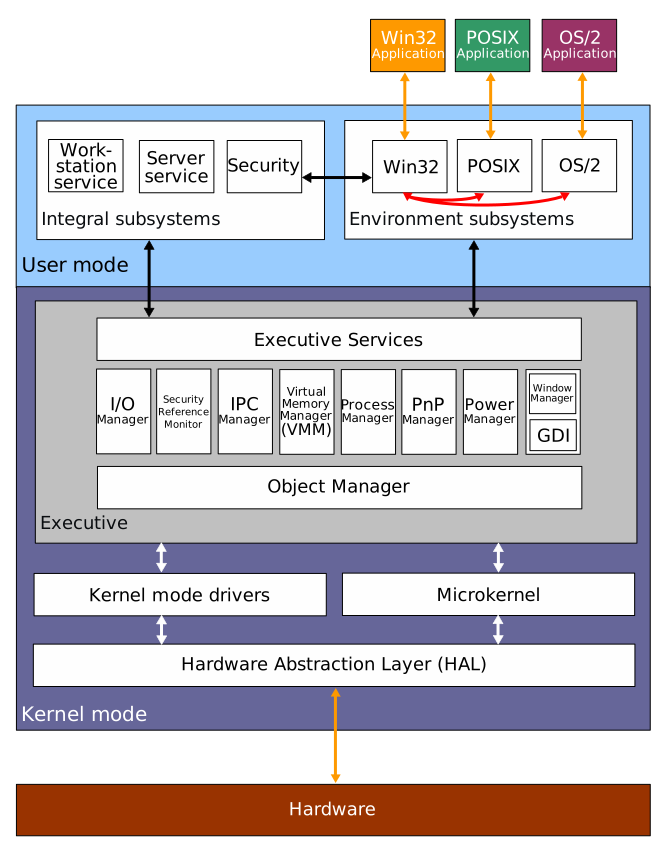
- Windows 2000
- How Windows Kernel Draws Graphics - YouTube
- Windows also has the abstraction layer, translation layer, and the driver layer.
- Windows features kernel debugging.
.sysis the system library file
2. Development
2.1. Microsoft Foundation Class Library
- MFC
- C++ library for developing desktop applications on Windows, that first introduced in 1992.
2.2. .NET Framework
- It is a set of libraries and frameworks that makes application, so that it can be run on the Common Language Runtime(CLR) virtual machine.
- The program is compiled into Common Intermediate Language(CIL) for the CLR to run.
- Later also developed into the cross-platform version of it, .NET platform which includes .NET Core
2.2.1. Framework
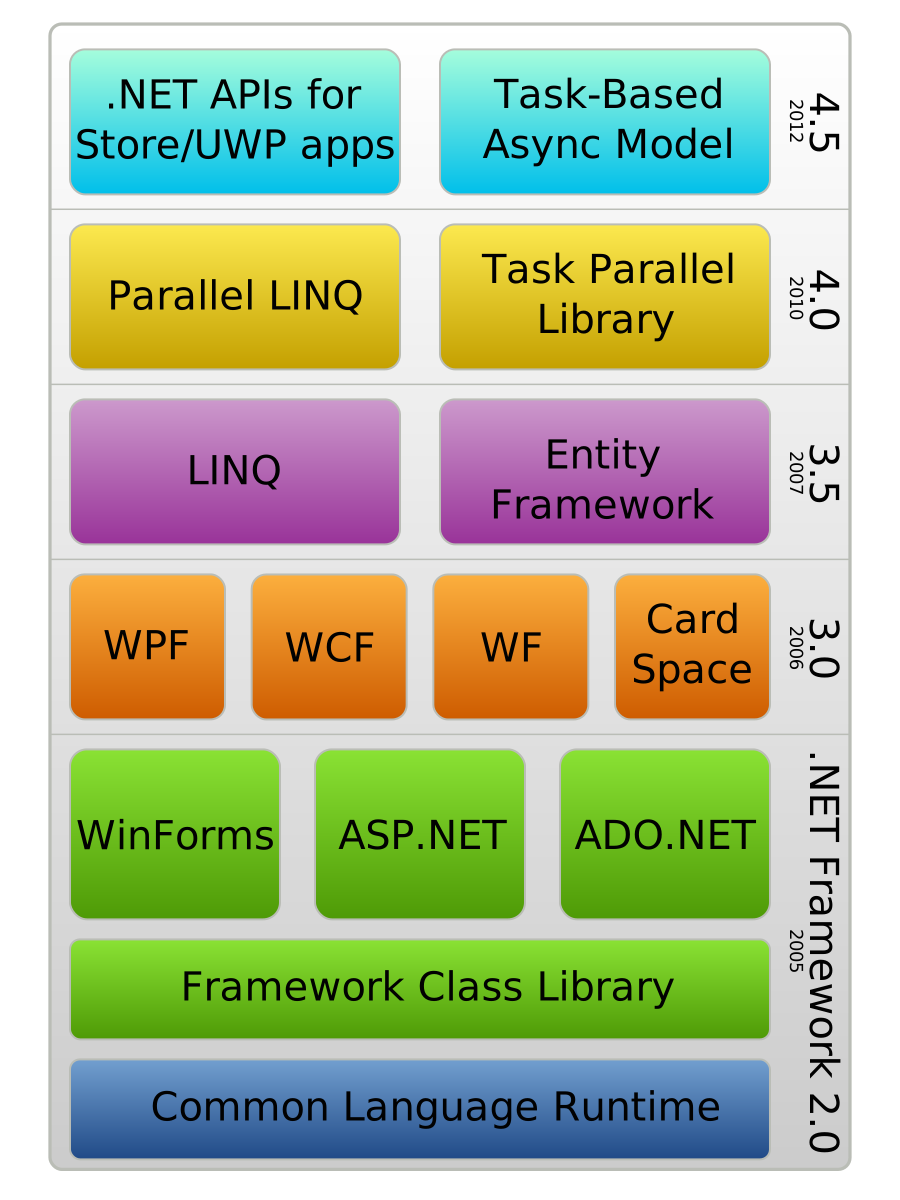
2.2.1.1. Windows Presentation Foundation
- WPF
- Graphical Subsystem
2.2.1.2. Windows Form
- GUI library part
2.3. Universal Windows Platform
- UWP
- Extension of WinRT that enables the applications to run on many microsoft hardwares at the same time.
2.4. Windows API
- WinAPI
2.5. Windows Runtime
- WinRT
- Binary interface that uses Component Object Model(COM)
There are two C runtime
- UCRT universal C runtime
- MSVCRT Microsoft Visual C Runtime (older compatibility)
MinGW and Cygwin also provides the UNIX like C Runtime.
2.6. Visual Studio Build Tools
Available on the official website.
It is also part of the Visual Studio.
The build tools component includes cl.exe,
and Windows SDK includes the stdlib.h and other
libraries.
Use the development shell (preferably x64) to build a project.
3. Bootable USB
- Use any of
cat,cp,dd,tee,pvto flash.isoon the thumbdrive itself.
3.1. IRST
- In some case of intel cpu:
- Install Intel Rapid Storage Technology driver on the thumbdrive thereafter.
- Install the driver on the external drive, and install it at the install time.
3.2. Intel VMD Technology
- Volume Management Device
3.3. woeUSB
- Does the special processing required for a Windows bootable usb.
Etcher and simple cp may not be able to produce a
proper install medium, due to driver issues.
4. Registry
4.1. Export and Import
Subtree of registry can be exported to .reg file,
and can be imported again by running it.
The format somewhat resembles TOML as they have section and key-value pairs.
Windows Registry Editor Version 5.00

[HKEY_LOCAL_MACHINE\SYSTEM\CurrentControlSet\Control\Keyboard Layout]
"Scancode Map"=hex:00,00,00,00,00,00,00,00,03,00,00,00,01,00,3A,00,3A,00,01,00,00,00,00,00  < binary value

[HKEY_LOCAL_MACHINE\SYSTEM\CurrentControlSet\Control\Keyboard Layout\DosKeybCodes]
"00000402"="bg"  < string value
4.2. Keyboard Remap
Keyboards can be remapped on scancode level.
Scancode Map under HKEY_LOCAL_MACHINE\SYSTEM\CurrentControlSet\Control\Keyboard Layout
specifies the remapping with format as follows:
00 00 00 00  // version
00 00 00 00  // flags
03 00 00 00  // # of rebinds + 1
01 00 3A 00  // bind #1: CapsLock (3A) to ESC (01)
3A 00 01 00  // bind #2: ESC (01) to CapsLock (3A)
00 00 00 00  // null terminator
The table of scancodes can be found here.
5. Programs
taskmgrtask managersysdm.cplsystem properties
5.1. Run
shell:startupshell:RecycleBinFolder
5.2. Windows App
The applications installed via Windows store are stored separately.
- System:
- User:
C:\Users\<USERNAME>\AppData\Local\Microsoft\WindowsApps\
6. Shortcuts
C:\ProgramData and C:\Users\<USERNAME>\AppData folders are hidden.
%PROGRAMDATA% and %APPDATA% variable is recognized.
C:\Users\All Users\ is a link to C:\ProgramData\.
Start menu
- System:
C:\ProgramData\Microsoft\Windows\Start Menu\Programs\ - User Common:
C:\Users\Default\AppData\Roaming\Microsoft\Windows\Start Menu\Programs - User:
C:\Users\user\AppData\Roaming\Microsoft\Windows\Start Menu\Programs\
Startup app
- System:
C:\ProgramData\Microsoft\Windows\Start Menu\Programs\Startup\ - User:
C:\Users\<USERNAME>\AppData\Roaming\Microsoft\Windows\Start Menu\Programs\Startup\
Task bar
- User:
C:\Users\<USERNAME>\AppData\Roaming\Microsoft\Internet Explorer\Quick Launch\User Pinned\TaskBar\
Public Desktop
C:\Users\Public\Desktop\
7. PowerShell
$env:ENVVARNAME to use the environment variable.
- In
cmd, it is just%ENVVARNAME%.